
Checkup 1.0.7 · User guide
Agent not detected
Reviewed
Check the desktop Agent connection when a station cannot start or shows Offline.
Start with the station status
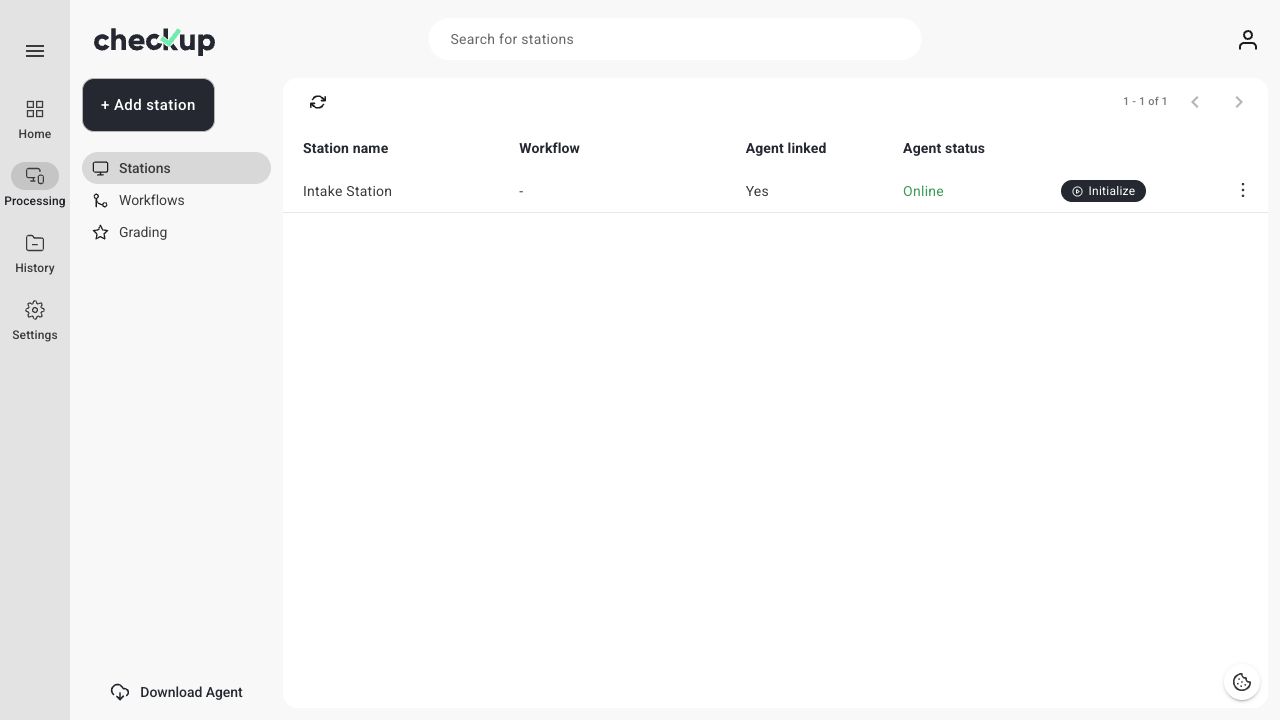
Open Processing → Stations and find the station you intend to use. Read both Agent linked and Agent status.
| What you see | What to check |
|---|---|
| Agent linked: No | Install Agent and complete the workspace/station link. |
| Agent linked: Yes; status: Offline | Open Agent on the linked computer and check its connection. |
| Agent linked: Yes; status: Online | Confirm you selected the correct station and check whether it is already in use. |
| View mode | Another processing session is using the station. Coordinate with that operator. |
1. Confirm Agent is installed and running
Use Download Agent from Home if it is not installed. Launch the desktop application and leave it running on the computer connected to your devices. Having the Checkup website open alone does not start the desktop Agent.
2. Confirm the workspace and station
Check the workspace and station shown in Agent. They must match the station you are trying to initialize in the browser. If setup is incomplete, restart sign-in from Agent and follow Connect Checkup Agent to a station.
3. Check the connection and refresh
Make sure the linked computer is awake and has an internet connection. Reopen Agent if needed, then choose Reload in Stations. If Agent displays an update prompt, follow that prompt and check the status again afterward.
4. Check for an existing session
A station in use may offer View mode. Ask the operator to complete the work and exit their session. If the session must be ended from the station list, use Finalize a station.
5. Distinguish Agent connection from USB detection
An Online Agent does not guarantee that a particular phone is connected. Once the station is initialized, check the USB cable and the device’s preparation prompts. On iOS, allow the requested connection permissions. On Android, follow the instructions for Developer Options and USB debugging.
If the problem continues
Tell support your operating system, Agent version, workspace and station names, the exact status or error, and whether the Agent or only one device is missing. Include the time of the failure. Do not include passwords or verification codes.
Screens show the Checkup interface with sample data. Names and results in your workspace will differ.